How to Create AI UGC Videos That Actually Look Real
Most AI videos scream 'fake' in seconds. Learn the exact steps to create authentic-looking UGC content that your audience will engage with — from character design to scene selection.
The biggest problem with AI-generated content right now is that it looks AI-generated. Viewers scroll past it instantly. But when you get authenticity right, AI UGC performs just as well as — or better than — content shot on a phone.
This guide walks you through the exact steps and prompts to create an AI video that feels genuinely human. No uncanny valley, no plastic skin, no dead eyes. Just content that looks like someone actually filmed it.
I used MakeInfluencers for this tutorial, but the same principles apply to any tool as long as you are using current models like GPT Image 2 or Nano Banana Pro for stills and Seedance 2.5 or Kling 3.0 for video.
Why Authenticity Is Everything
UGC works because it feels real. It is a person talking to the camera in their bedroom, not a polished studio ad. The moment something feels "off," trust drops and people scroll.
Here is what makes UGC feel authentic:
- Imperfect lighting — Natural light, warm lamps, slightly uneven exposure
- Casual settings — Bedrooms, bathrooms, kitchens, cars
- Relaxed body language — Not stiff, not posed, not performative
- Real skin texture — Freckles, pores, subtle imperfections
- Phone-quality framing — Slightly off-center, close-up, handheld feel
Your AI content needs to check these same boxes. Let me show you how.
Step 1: Create Your Character
The first step is generating a base character. This is the foundation — every look and video you create will be built from this character, so getting it right matters.
On MakeInfluencers, go to Characters and click Generate Character. Give your character a name, pick a skin style (I went with Standard for natural-looking skin), and write a detailed description prompt.
Here is the prompt I used:
A young woman with long, curly red hair, fair skin with light freckles, and a natural warm smile. She has a slim build and is wearing a simple white mini dress with thin spaghetti straps and a straight neckline.
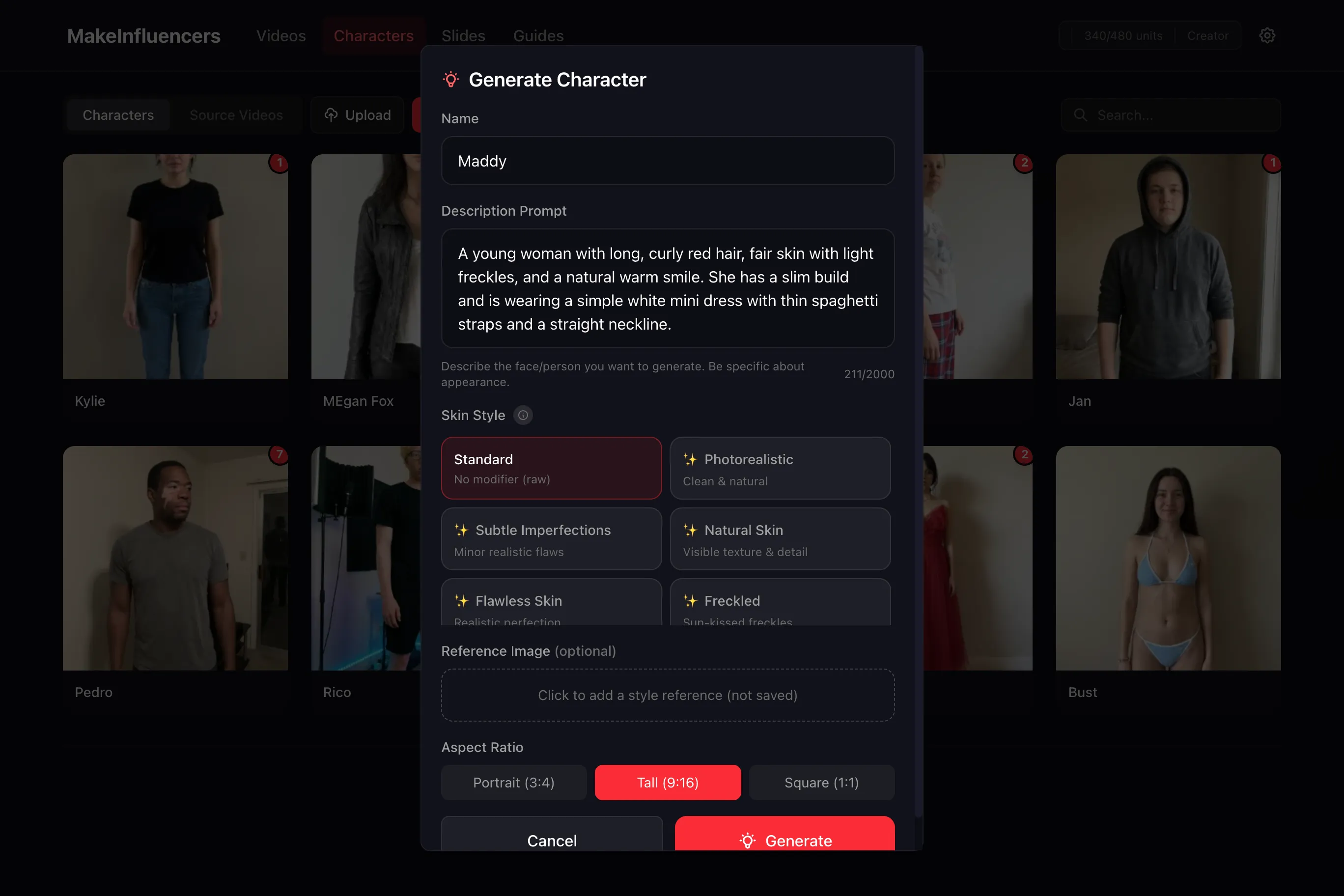
Hit Generate and you get your base character reference photo:
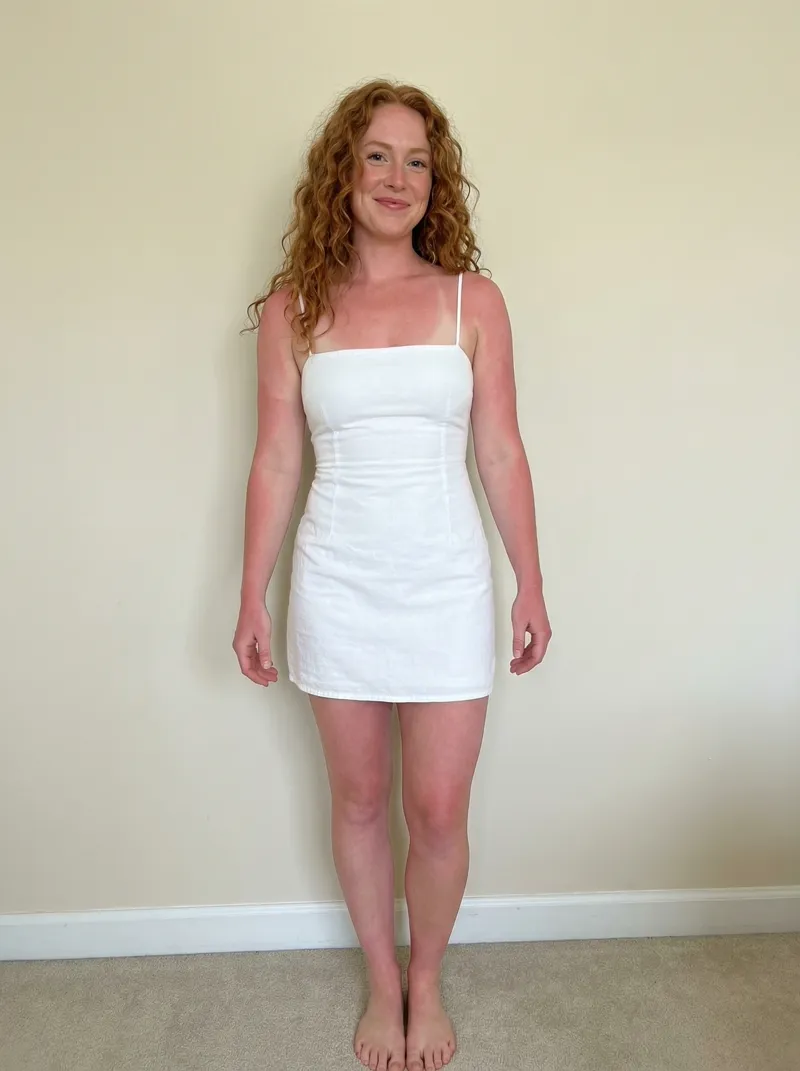
What Makes This Prompt Work
Notice the level of detail. Instead of "a woman with red hair," the prompt specifies:
- Hair texture — "long, curly" not just "red hair"
- Skin details — "fair skin with light freckles" gives the AI real texture to work with
- Expression — "natural warm smile" avoids the stiff AI grin
- Body type — "slim build" gives clear proportions
- Clothing specifics — "simple white mini dress with thin spaghetti straps and a straight neckline" anchors the visual
Generic prompts produce generic, AI-looking characters. The more specific and human you get, the more real the output looks.
Pick Standard or Subtle Imperfections skin style for UGC. "Flawless Skin" might seem tempting but it pushes the character into uncanny valley — real people have texture.
Step 2: Create a Look
Now that you have a base character, create a Look that puts her in a realistic UGC scenario. On MakeInfluencers, click Create Look, choose Freeform, and write a prompt that describes the scene you want.
Here is the prompt I used:
Edit the image so the same woman is lying in bed in a relaxed, intimate position like the reference image, turned slightly on her side with her face close to the pillow, framed casually as if taken late at night. She is wearing a simple white top, hair loose and slightly messy, with a calm, natural expression, no glasses. The room is softly and evenly lit by ambient indoor lighting (lamp or ceiling light), creating a warm, gentle glow across her face with smooth falloff and no harsh shadows. Maintain authentic UGC-style realism with subtle digital noise, slightly imperfect exposure, and realistic skin texture including pores, freckles, and natural softness. The image should feel quiet, cozy, and candid, like a genuine phone photo taken in bed—no flash, no dramatic contrast, no beauty filters, just natural indoor lighting and an intimate, real atmosphere.
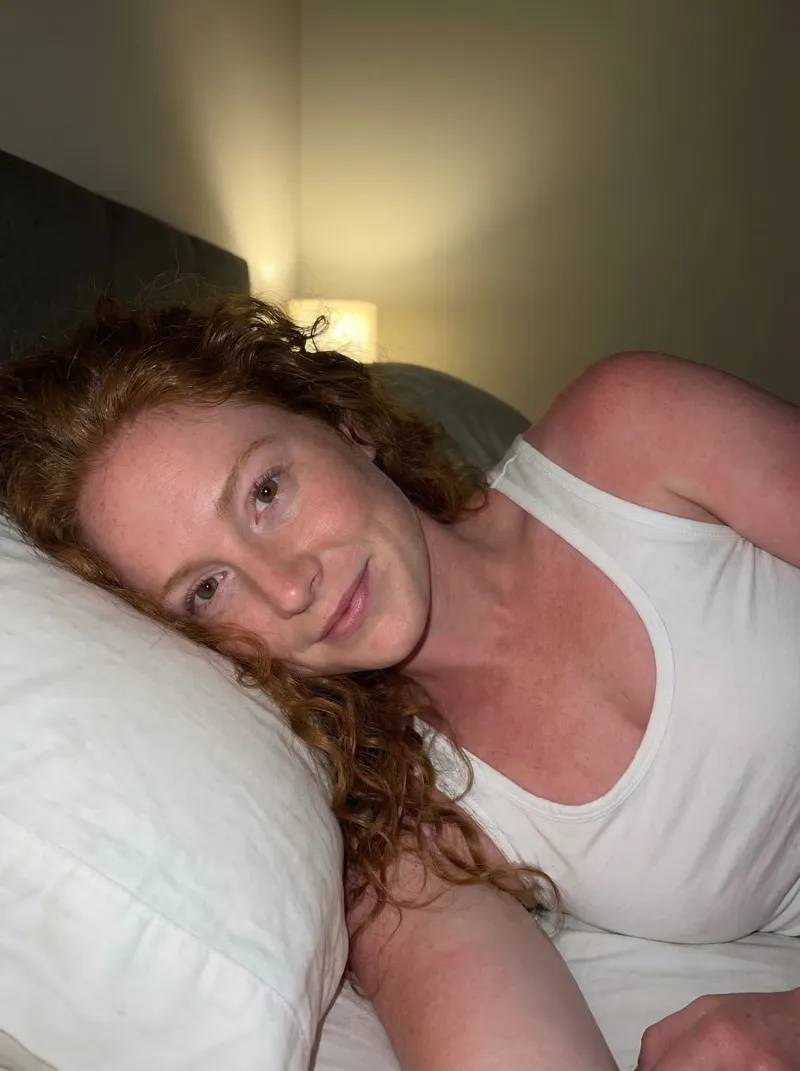
Why This Look Feels Real
The prompt is doing a lot of heavy lifting here. Let me break down the key parts:
- "lying in bed, turned slightly on her side" — Gives a casual, unposed body position
- "framed casually as if taken late at night" — Tells the AI this should look like a phone selfie, not a photoshoot
- "subtle digital noise, slightly imperfect exposure" — Explicitly asks for phone-camera imperfections
- "realistic skin texture including pores, freckles, and natural softness" — Prevents the AI from smoothing out the skin
- "no flash, no dramatic contrast, no beauty filters" — Guards against the AI defaulting to polished, artificial looks
The result looks like a real person took a selfie in bed. That is the standard you are aiming for.
Scene Ideas for UGC
Think about where real people actually film content:
- In bed — Morning routines, get-ready-with-me, casual talking
- Bathroom mirror — Skincare, outfit checks, quick updates
- Kitchen — Cooking content, snack reviews, day-in-my-life
- Car — Rants, reactions, day-in-my-life vlogs
- Walking outside — POV content, city walks, lifestyle clips
- Desk/workspace — Productivity content, reviews, unboxings
Avoid white studio backdrops, overly decorated sets, or anything too polished. The whole point of UGC is that it is not polished.
Step 3: Animate It
This is where the magic happens. Click the red Animate button on your look, select Describe Motion, and choose Premium mode (or Enhanced — both work well, Premium gives the best results). Turn Sound ON so the character speaks.
Here is the prompt I used:
A real-time, handheld UGC-style selfie video filmed in a softly lit bedroom at night, the woman lying on her side on a bed with her head resting on a pillow, phone held close in a casual selfie position. The framing is intimate and imperfect, with subtle handheld shake and minor shifts as she moves. She readjusts naturally-lifting her head, shifting her weight forward, and leaning onto her elbows in one smooth, unforced motion-causing the camera to wobble slightly in sync with her movement. Her skin retains high-detail realism with visible pores, freckles, mild redness, and natural softness, no smoothing or stylization. She looks into the camera and speaks calmly and conversationally: "I don't know how to tell you this but..." then pauses briefly on the word "but", holding a beat of suspense. During the pause, she glances to the side with a playful, knowing expression, a faint smile forming, before looking back into the camera and finishing clearly, "...I'm not real." Her facial expressions, eye movements, and mouth sync are fluid and natural, with realistic breathing and micro-movements. Lighting remains warm and consistent from a bedside lamp, shadows shifting subtly as she moves, preserving an authentic, intimate, late-night UGC realism throughout with fully real-time motion and no cinematic exaggeration.
What Makes This Animation Prompt Work
The prompt is long, but every part is doing something important:
- "handheld UGC-style selfie video" — Sets the overall aesthetic from the start
- "subtle handheld shake and minor shifts" — Real phone footage is never perfectly stable
- "readjusts naturally — lifting her head, shifting her weight forward" — Gives the AI specific body movements to animate, not just a static talking head
- "camera to wobble slightly in sync with her movement" — Matches what happens when someone moves while holding their phone
- "visible pores, freckles, mild redness, and natural softness" — Reinforces skin realism even in the video prompt
- "speaks calmly and conversationally" — Prevents robotic, over-enunciated speech
- "pauses briefly... glances to the side with a playful, knowing expression" — Adds micro-expressions and timing that make the performance feel human
- "no cinematic exaggeration" — Keeps it grounded in reality
Seedance 2.5 is the strongest fit for longer shots, generated audio, and mixed video/image references. Kling 3.0 is a strong cinematic alternative, while Seedance 2 costs less for shorter 4–15 second clips.
The Authenticity Checklist
Before you post any AI UGC, run through this:
- Would I believe this was filmed on a phone? — If not, something needs to change
- Does the skin look like real skin? — Texture, pores, imperfections
- Is the setting somewhere a real person would film? — Bedrooms over studios
- Is the lighting natural? — Warm, uneven, slightly imperfect
- Does the expression feel genuine? — Relaxed, not performed
- Is the framing casual? — Slightly off-center, close-up, intimate
If you can answer yes to all six, your content will perform.
What Comes Next
Authenticity is the foundation, but there is more you can do to level up your AI UGC:
- Pair with real audio — Use trending sounds or record a genuine voiceover
- Add subtle post-production — Light grain, a slight vignette, or a phone-camera color grade can sell the look
- Build a character library — Create 3-5 distinct characters for different content verticals
- Test and iterate — Track which videos perform best and refine your character settings based on what works
Why Your AI UGC Still Looks Fake (and How to Fix It)
Even with detailed prompts, certain "AI tells" leak into output. Here is the field guide to spotting them and the fix for each:
Plastic skin and over-smoothing. The single biggest giveaway. Fix: explicitly negative-prompt smoothing — "no skin smoothing, no beauty filter, visible pores and freckles, slight redness in cheeks and nose." Some tools default to a cosmetic filter that needs to be turned off in the look settings, not just the prompt.
Dead eyes and unbroken gaze. Real people blink, glance off-camera, and have micro-saccades. Fix: ask for "natural blinks every 2-4 seconds, occasional brief glances to the side or down at the phone, no continuous direct stare." If your animation tool exposes an expressiveness slider, push it up.
Robotic mouth movement. AI lip-sync from older models locks the lower face. Fix: use a current generation model with audio support (Seedance 2.5, Kling 3.0, or Gemini Omni Flash) and add "natural micro-expressions during speech, lips form full shapes for each phoneme, mouth corners shift slightly with emphasis."
Too-perfect lighting. Studio-grade lighting is the fastest way to break UGC. Fix: prompt for "single warm light source from one side, soft shadow on the opposite cheek, slight ambient bounce from the wall." Mention the actual fixture — "bedside lamp", "window light from camera-left", "overhead kitchen light".
Generic settings. A featureless white room screams stock content. Fix: name three or four specific objects in the background — "messy bedside table with water glass and book", "kitchen counter with half-used coffee mug and unopened mail". Specificity sells reality.
Stiff body language. A character standing perfectly still is uncanny. Fix: include a micro-motion in every animation prompt — "shifts weight to left foot mid-sentence", "tucks hair behind ear", "leans slightly forward on elbow". Real bodies adjust constantly.
If your output checks all six boxes and still feels off, the culprit is usually the model itself. Older video models (Runway Gen-2, Pika 1.0, early Kling) cannot produce skin texture at the level current models can. Upgrade the model before you blame the prompt.
Best AI Models for Realistic UGC in 2026
Not all models are equal for realism. Pick based on what the clip needs to do:
- Nano Banana Pro (image) — best base character and look generator. Handles skin texture, freckles, and natural expressions better than most still models.
- Seedance 2.5 (video) — best MakeInfluencers option for longer 4–30 second shots, generated audio, and workflows that combine a source video with supplemental image references.
- Kling 3.0 (video) — strong cinematic motion for text-to-video and image-to-video shots, with standard and HD options.
- Seedance 2 (video) — the lower-cost Seedance option for 4–15 second text, image, and reference-video generations.
- Gemini Omni Flash (video) — a fast option for short video workflows with synchronized audio.
- Older models to avoid for UGC — Runway Gen-2 (replaced by Gen-3), Pika 1.0, early Synthesia avatars. They produce a recognizable "AI ad" feel that current viewers scroll past.
For more on the model layer, see our comparison breakdowns of UGC-focused tools.
Posting Realistic AI UGC at Scale
A single realistic clip is a proof of concept. Real growth comes from posting 30-60 of them across multiple personas. Two structural problems show up at volume:
Character drift. Without a persistent character system, every new generation produces a slightly different face. Build a character library where the same base character is reused across every clip — that consistency is what makes a viewer recognize "your" creator across the For You feed.
Posting tax. Manually re-uploading 30 clips per month across two TikTok and two Instagram accounts is 3-4 hours of tedious work. Look for tools that publish directly to the account, not just export the file.
If you are pushing for organic distribution and want both pieces solved, see the AI UGC video generator guide for the full posting workflow.
Frequently Asked Questions
How do I make AI UGC videos look realistic?
Three levers, in order of impact: (1) use a current-generation model (Seedance 2.5 or Kling 3.0 for video, GPT Image 2 or Nano Banana Pro for stills), (2) prompt explicitly for skin texture, micro-motion, and natural lighting — the defaults of most models lean cosmetic, (3) film in casual settings where real UGC happens (bedrooms, cars, kitchens) rather than studio backdrops. Skip any of these and the AI tell shows up.
Why does my AI video look fake even with a good prompt?
Usually one of three causes: a beauty-filter setting at the model or look layer is overriding the prompt, the selected model is not suited to realistic character motion, or the scene is over-lit. Try Seedance 2.5 or Kling 3.0 and check those three causes before iterating the prompt further.
Can AI UGC actually perform on TikTok?
Yes — when it does not read as AI. Accounts running consistent characters with current-gen models and realistic settings see engagement rates comparable to phone-shot UGC. The uncanny-valley AI ads from 2024-2025 trained the audience to scroll past anything that screams synthetic, so the bar for "passes as real" is now the floor for "performs."
What is the best free way to test AI UGC?
Most current-gen tools offer free credits or a free tier with watermarked output. MakeInfluencers Starter is $39/mo with 360 monthly credits. Kling has a free daily allowance. The cheapest path to a usable UGC clip is one of these — the older free generators (legacy Pika, free-tier Sora workarounds) produce output that will not pass the realism bar.
How long should an AI UGC clip be?
Match the platform format. TikTok and Reels reward hooks within the first 1.5 seconds and total runtime under 30 seconds. YouTube Shorts allows up to 60 seconds but the first 3-second retention is what controls the algorithm. Generate 5-second base clips and stitch them — extending one long clip in a single generation gives the model too much room to introduce drift.
Do I need to disclose AI in my UGC posts?
Platform rules differ. TikTok and Meta require disclosure for AI-generated likenesses of real people and AI content in political or social-issue contexts. For brand UGC with a clearly fictional character, most platforms do not require disclosure, but their AI-content labels are starting to auto-apply to videos that trip detection. Read each platform's current AI policy before posting at scale.
Try It Yourself
You have the prompts, the workflow, and the checklist. The only thing left is to try it.
Create your first AI UGC video on MakeInfluencers — no face, no camera, no editing required.